|
công cụ tìm kiếm bảng dữ liệu linh kiện điện tử |
|
|
công cụ tìm kiếm bảng dữ liệu linh kiện điện tử |
|
NA-RTSM bảng dữ liệu(PDF) 23 Page - Omron Electronics LLC |
|
|
|||||||||||||||||||||||||||||
NA-RTSM bảng dữ liệu(HTML) 23 Page - Omron Electronics LLC |
|
|
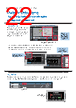
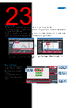
23 / 36 page  Click the variable in the global variable table to show a list of the locations where the variable is used in the Cross Reference Tab Page. Click the location to access the object where the variables is used. Cross references The same GUI for the cross reference function as the NJ/NX/NY Controller can be used. When a variable is clicked in the global variable table, a list of the locations where the variable is used is displayed in the Cross Reference Tab Page. By clicking the location, you can access the object, subroutine, or ladder program where the variable is used across the entire project. This makes screen design and debugging quicker and easier. 1) Enter a text string to search/replace 2) Start to search/replace Display the object to search/replace 3) The results are displayed Search and Replace You can search and replace text strings in all subroutines (Visual Basic), objects, and variables within a project. It is quick and easy to edit and debug variable names and switch labels. 23 |
|
Link URL |
| Cho đến nay ALLDATASHEET có giúp ích cho doanh nghiệp của bạn hay không? [ DONATE ] |
Alldatasheet là | Quảng cáo | Liên lạc với chúng tôi | Chính sách bảo mật | Liên kết đến bảng dữ liệu | Trao đổi link | Tìm kiếm theo nhà sản xuất All Rights Reserved©Alldatasheet.com |
| Russian : Alldatasheetru.com | Korean : Alldatasheet.co.kr | Spanish : Alldatasheet.es | French : Alldatasheet.fr | Italian : Alldatasheetit.com Portuguese : Alldatasheetpt.com | Polish : Alldatasheet.pl | Vietnamese : Alldatasheet.vn Indian : Alldatasheet.in | Mexican : Alldatasheet.com.mx | British : Alldatasheet.co.uk | New Zealand : Alldatasheet.co.nz |
|
Family Site : ic2ic.com |
icmetro.com |
 Vietnamese ▼
 English
 Chinese
 German
 Japanese
 Russian
 Korean
 Spanish
 French
 Italian
 Portuguese
 Polish
 Vietnamese
 Indian
 Mexican
 British
 New Zealand