|
công cụ tìm kiếm bảng dữ liệu linh kiện điện tử |
|
|
công cụ tìm kiếm bảng dữ liệu linh kiện điện tử |
|
E32-R16 bảng dữ liệu(PDF) 19 Page - Omron Electronics LLC |
|
|
|||||||||||||||||||||||||||||
E32-R16 bảng dữ liệu(HTML) 19 Page - Omron Electronics LLC |
|
|
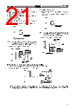
19 / 38 page  E3X-NH E3X-NH 19 Sensitivity Adjustment (Tuning) A. Manual-tuning (Fine Sensitivity Adjustment) Note: The auto-tuning function will be disabled if manual-tuning is executed. 1. After setting the sensitivity of the E3X-NH, select the adjustment direction with the UP/DOWN selector in the ADJ mode. (1) (2) 2. Press the SET button in ADJ mode. Be sure that the threshold changes whenever the SET button is pressed. If two threshold indicators are ON, the threshold will be set to the middle value between the values corresponding to these indicators. Press for 0.5 to 2.5 s 3. Set the mode selector to RUN. B. Auto-tuning (Automatic Sensitivity Com- pensation) 1. Set the mode selector to TEACH. Press the SET button once without a sensing object in the sensing area. Be sure that all the threshold indicators (red) are ON. The built-in buzzer beeps once when the threshold indicators are ON. Press for 0.5 to 2.5 s 2. Set the mode selector to ADJ and press the SET button for three seconds minimum. Be sure that the threshold indicator (red) flashes. The built-in buzzer beeps continuously. Press for 3 s min. (2) (1) 3. Set the mode selector to RUN. The threshold indicator (red) will continue to flash while the the auto-tuning function is enabled. |
|
Link URL |
| Cho đến nay ALLDATASHEET có giúp ích cho doanh nghiệp của bạn hay không? [ DONATE ] |
Alldatasheet là | Quảng cáo | Liên lạc với chúng tôi | Chính sách bảo mật | Liên kết đến bảng dữ liệu | Trao đổi link | Tìm kiếm theo nhà sản xuất All Rights Reserved©Alldatasheet.com |
| Russian : Alldatasheetru.com | Korean : Alldatasheet.co.kr | Spanish : Alldatasheet.es | French : Alldatasheet.fr | Italian : Alldatasheetit.com Portuguese : Alldatasheetpt.com | Polish : Alldatasheet.pl | Vietnamese : Alldatasheet.vn Indian : Alldatasheet.in | Mexican : Alldatasheet.com.mx | British : Alldatasheet.co.uk | New Zealand : Alldatasheet.co.nz |
|
Family Site : ic2ic.com |
icmetro.com |
 Vietnamese ▼
 English
 Chinese
 German
 Japanese
 Russian
 Korean
 Spanish
 French
 Italian
 Portuguese
 Polish
 Vietnamese
 Indian
 Mexican
 British
 New Zealand